Performance Testing
Aim for simple designs and reproducible results
Why automate performance tests
- A repeatable and consistent process that checks reliability issues
- Part of the default software development life cycle
- For continuous performance testing
- Move from reactive to proactive approach
- Detect issues earlier -> shift left
Requirements
- Must be easy to run in build environments and locally (portability).
- Must evaluate metrics and fail based on conditions (automated validation).
- Must support different performance test models (spike, smoke, load, stress).
Load Test Types
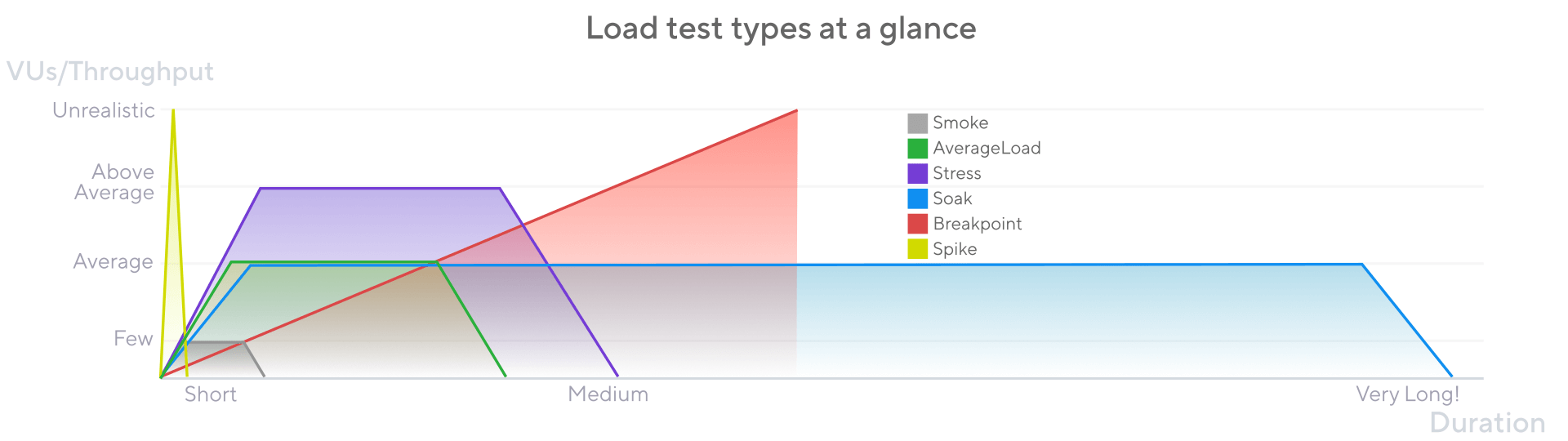
| Type | VUs/Throughput | Duration | Description | When? |
|---|---|---|---|---|
| Smoke | Low | Short (seconds or minutes) | Validate that your script works and that the system performs adequately under minimal load. | When the relevant system or application code changes. It checks functional logic, baseline metrics, and deviations |
| Load | Average production | Mid (5-60 minutes) | Assess how your system performs under expected normal conditions. | Often to check system maintains performance with average use |
| Stress | High (above average) | Mid (5-60 minutes) | Assess how a system performs at its limits when load exceeds the expected average. | When system may receive above-average loads to check how it manages |
| Soak | Average | Long (hours) | Assess the reliability and performance of your system over extended periods. | After changes to check system under prolonged continuous use |
| Spike | Very high | Short (a few minutes) | Validate the behavior and survival of your system in cases of sudden, short, and massive increases in activity. | When the system prepares for seasonal events or receives frequent traffic peaks |
| Breakpoint | Increases until break | As long as necessary | Gradually increase load to identify the capacity limits of the system. | A few times to find the upper limits of the system |
Advanced testing
While K6 is known for its simplicity and performance, basic scripts rarely reflect real-world load scenarios. Advanced scripting empowers teams to simulate realistic workflows, measure SLIs, and analyze system behavior under varying stress conditions.
Simple test
Simple tests usually
- Use static data.
- Test only individual endpoints.
- Lack of error handling.
- Don’t simulate user think-time or real branching logic.
Simple tests often ...
- Don't show real issues. Those might only be detected when using real use-cases (e.g. paging, filtering, searching).
- Hide concurrency issues.
- Don't test auth issues like token expiry or rate limits like throttling
Advanced tests
Matter because
- Business flows are complex. Real users don’t hit a single endpoint in isolation.
- Test coverage needs flexibility. You must handle branching logic, retries, error tolerance.
- Teams need automation-ready, scalable test code.
We therefore need
- To emulate user paths, not endpoints.
- Include think-time (sleep()).
- Handle different data and dynamic responses.
- [Optional] Use conditions to go different paths.
- [Optional] Randomize call, flows, scenarios.
- [Optional] Differentiate by user role.
- [Optional] Implement retry mechanisms for errors.
- [Optional] Navigate through pages.
- [Optional] Different behavior based on response values.